Boords alternatives in 2026, sorted by why you are looking
Nine alternatives to Boords, arranged by the reason people go looking: price, drawing, animation, a production office, or a board that reaches the shoot.
Boords is a browser-based storyboard tool built around creating boards, animatics, shot lists and client review. If you are looking for an alternative, the useful question is what you want to change.
Updated 22 September 2026 for Storybrdr Teams.
For some people it is price. Others need better drawing tools or a wider production platform. For directors and production teams, the bigger gap often appears after approval, when the storyboard has to become a shooting plan and the same shots start being rebuilt somewhere else.
People who do go looking usually have something more specific in mind than dissatisfaction. Sometimes it is the per-seat price as a team grows, or drawing that is not up to the frames the job needs. More often it is what happens after approval: the board gets signed off, and three weeks later somebody is retyping the whole thing into a spreadsheet. So this is arranged by reason rather than by rank, because the right replacement depends entirely on which reason is yours.
I make Storybrdr, so factor that into the recommendation. I have tried to make the comparison useful by being clear about where the other tools do things Storybrdr does not.
Prices were checked on each vendor's own page on 8 September 2026 and are given twice: as the vendor publishes them, and on a shared basis of pounds excluding VAT at the European Central Bank reference rate of 4 September 2026, $1 = £0.7391. Boords bills in US dollars, so a UK card also pays whatever the bank charges to convert.
For reference, Boords published this on 8 September: Solo $39 a month or $26 a month billed yearly, with 250 AI images; Pro $75 or $50 yearly for up to 5 users; Team $125 or $85 yearly for up to 10; Agency $250 or $165 yearly for up to 30. On the shared basis, Solo is about £28.82 a month, or £19.22 billed yearly.
The short version
Eight reasons people leave, and where each one leads.
- The board stops being useful once it is approved. Storybrdr, £24.17 a month excluding VAT.
- You need professional drawing and animation. Toon Boom Storyboard Pro, £69 a month, published in sterling.
- The budget is zero. Storyboarder, free.
- Price is the whole problem. Plot, from about £7.38 a month.
- You need the production office as well. StudioBinder, from about £21.43 a month.
- You think in a canvas rather than a grid. Shotwright or Milanote, from about £7.38 a month.
- Generated frames are central to how you work. Storyflow, from about £7.38 a month.
- You mainly want to draw. Procreate plus a board tool, a one-off App Store purchase.
The rest of this is the detail behind each of those.
If you want the board to continue onto the shoot: Storybrdr
Boords is built around making a storyboard, showing it, getting it approved and turning it into a shot list. Storybrdr carries those same shots on into the day itself.
The approved shots become setups and shooting days. On the day they open on a phone in shooting order, approved frame beside each one, which is what you want at six in the morning when nobody is opening a PDF. Each take goes in as it happens and the one you want is circled; a pickup keeps the reason it was needed; a continuity photograph sits against the shot it has to match instead of somewhere in a camera roll with four hundred others. Wrap adds up what is in the can, what was partial and what was dropped, and hands the editor something to read that does not need a phone call.
What that removes is a rebuild. On most jobs I have worked on it happens by hand: the approved board becomes a spreadsheet, the spreadsheet becomes somebody's notebook, and the notebook becomes an email to the edit. It also brings a little script-supervision discipline to crews that do not have a script supervisor, without pretending to replace one. On Set covers how the day itself works.
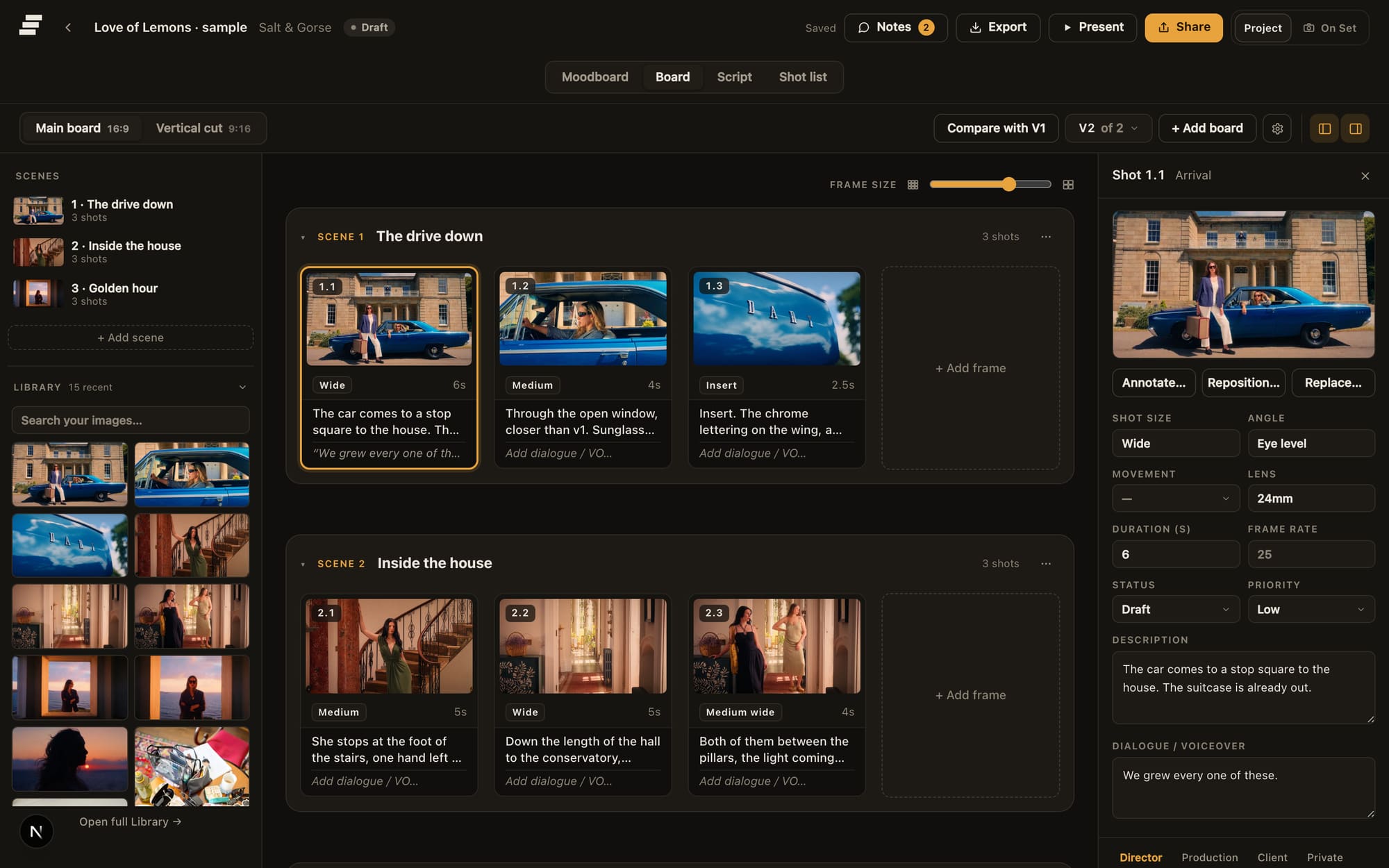
The approved board.
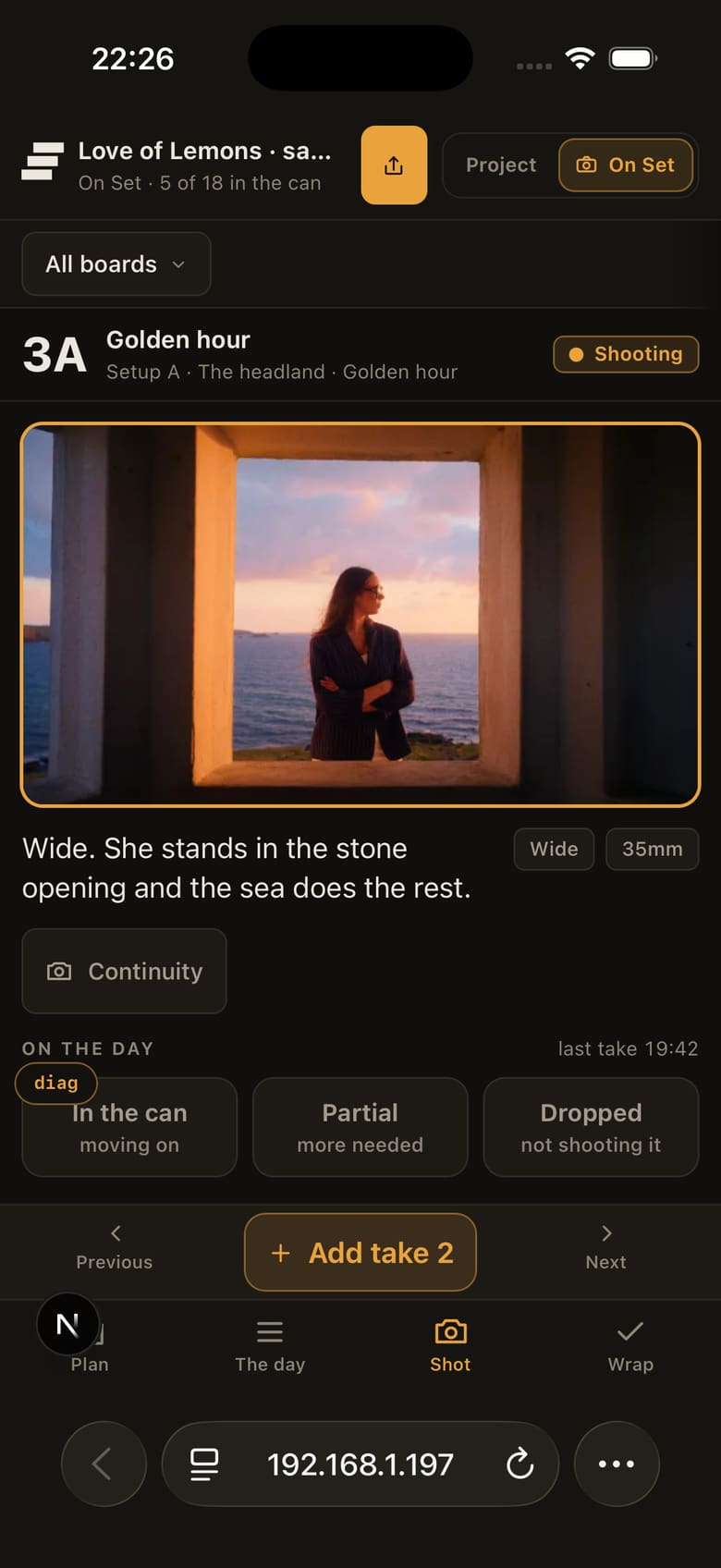
The same shots, running the day.
There is also a difference in approach to AI worth stating plainly. Boords will generate frames for you, 250 a month on Solo. Storybrdr does not generate frames; it uses AI to tag your own uploads so the library is searchable by what is in the picture months later. If generated frames matter to your workflow, Boords already has them.
Price: £29 a month including UK VAT, which is £24.17 excluding VAT on the shared basis. Billed in pounds, so the pricing page figure is what leaves the account. Every feature is on every plan, On Set included. Thirty days free with the full product. A card starts the trial and nothing is charged until it ends.
Storybrdr takes a different approach to seats. Studio includes five seats and Agency ten, with the same product features on every plan. A member can also be limited to named projects, so a freelancer does not need access to the rest of the workspace. Client reviewers do not use seats. How Teams works has the detail.
Where the trade-off is. Animatics are the clearest trade-off. Boords has deeper animatic tools, and it also generates a shot list from an approved board; Storybrdr is focused further into production, where those shots become the shooting order and the record of the day. Boords also sells 5, 10 and 30-user plans, and still scales higher for a bigger crew. There is no importer, from Boords or anywhere. It will not draw for you. And if a subscription lapses the workspace goes read-only: every project still opens and a PDF can still be exported, nothing is deleted, but editing, comments and the client links you have sent are paused until you reactivate.
Fuller head to head at Storybrdr vs Boords.
If you need professional drawing and animation: Toon Boom Storyboard Pro
Toon Boom Storyboard Pro is the specialist here: a desktop application used across animation and television, where drawing, camera moves, timing, audio and the animatic itself are the product rather than features attached to a board. Boords is a web tool with drawing added. This is the other way round.
Price: Toon Boom's shop published sterling prices on 8 September: £69.00 a month, £600.00 a year or £1,710.00 every three years. Students pay £8.75 a month or £70.50 a year. The trial is 14 days.
What you give up coming from Boords is everything around the drawing: no client review link, no approval state, no production tracking, nothing for the shoot day, and a desktop install with the machine that implies. It is also the most expensive entry price on this list. It makes sense when drawing and animation are the reason you are changing tools. The production workflow will still need to live somewhere else.
If you want something free: Storyboarder
Storyboarder from Wonder Unit is free and open source on Mac, Windows and Linux: a proper drawing-first storyboard application with dialogue and action fields, a round trip to Photoshop, and exports for the edit and for PDF. Nothing basic is held back to sell you later.
Price: nothing.
What is missing is the collaborative half, which is most of what a Boords subscription buys: no client review by link, no approvals, no shared workspace, no production tracking, and the project file lives on one machine. If the requirement is simply a free application for drawing boards on a desktop, Storyboarder covers it. Collaboration, client review and production planning still need another workflow.
If price is the main issue: Plot
Plot is a browser storyboard tool that is cheaper than Boords and simpler on purpose. Frames, scenes and sharing, without a production platform behind them.
Price: checked on their pricing page on 8 September: Solo $9.99 a month with no collaborators, Pro $14.99 with 5 collaborators, Business $19.99 with unlimited collaborators. Storyboards are unlimited on all three. On the shared basis that is about £7.38, £11.08 and £14.77 a month, so Solo is roughly a quarter of Boords Solo at the monthly rate.
You are trading capability for the saving, knowingly: no animatics, limited shot information, no structured approval, nothing for the production. Adding collaborators is what moves you up a tier, which Boords includes lower down. For straightforward boards on a tight budget, it does the job.
If you want a broader production-management platform: StudioBinder
StudioBinder is the production office in one place: screenplays, AV scripts, breakdowns, stripboards, shooting schedules, call sheets, sides and a contacts list, with storyboards as one module among the lot. It is built for producers and coordinators more than for a director with a board problem.
Price: published on StudioBinder's support centre on 8 September: Starter $29 a month with 1 complimentary user, Indie $49 with 2, and Professional $99 with 4, with additional users at $25 per user per month. On the shared basis, about £21.43, £36.22 and £73.17 a month, and roughly £18.48 for each extra seat.
The catch for a Boords user is that the board you are coming for is one module, and its features climb the tiers, so the boarding you want may sit above the plan the paperwork needs. Nothing on the day is recorded against the frames: no takes, no circled take, no pickups, no continuity. StudioBinder makes more sense when the reason for leaving Boords is that you need a broader production-management platform. If the requirement is specifically to take an approved storyboard through the shoot, much of that additional platform sits outside the problem. More in Storybrdr vs StudioBinder.
If you prefer a freeform planning canvas: Shotwright or Milanote
Some directors do not want a grid at all. They want one surface with references, a rough shot list, a schedule and the crew on it, arranged the way this particular job wants to be arranged.
Shotwright is the closer of the two to Boords' territory. It carries planning material a frame-by-frame board has no place for, and it is explicit about stopping at the timeline: everything before the edit, then export. Price: free with 5 documents a month and unlimited editors; Pro $19 per editor a month with 50 documents, then $1 each; Studio $49 a month plus $12 per seat with 250 documents pooled across the workspace, all checked on their pricing page on 8 September. Boards and canvas nodes are unlimited on every tier. On the shared basis Pro is about £14.04 per editor, and Studio about £36.22 plus £8.87 a seat, which puts Pro under Boords Solo at the monthly rate.
Milanote is the looser one, and better for the fortnight before a board exists: references, colour, casting, sequence ideas. Price: free with 100 notes, images or links and 10 file uploads; then $9.99 a month billed annually or $12.50 billed monthly, per person, which is about £7.38 or £9.24 on the shared basis. There is a team plan at $49 a month billed annually.
The cost of a blank canvas is that the structure is yours to invent and maintain. It will hold a perfectly good shot list, and it will also let you build a different one on every job, which is fine until three people have to read it the same way at six in the morning. Scenes, shots, shooting order, lenses and approval status all have to be kept by hand. Shotwright's document allowance is the other ceiling: five a month on the free tier does not go far. Neither tool makes animatics, and neither keeps a record of what happened on the day. Both are good companions to a board tool rather than replacements for one.
If AI-generated frames are central to your workflow: Storyflow
Storyflow goes further into generation than Boords does, with a project-wide board and prompt-driven frame generation, and it starts cheaper.
Price: checked on their pricing page on 8 September: Free $0; Plus $9.99 a month or $95.88 a year; Pro $19 a month or $168 a year; Max $49 a month or $468 a year. Paid yearly those work out at $7.99, $14 and $39 a month, which is how the page headlines them. Storyflow's pricing page currently lists its Free plan as coming before the end of 2026, with 20 file uploads and no image generation. Team discounts start at 20% from three seats. On the shared basis, Plus is about £7.38, Pro about £14.04 and Max about £36.22.
The thing to know before moving is that the tiers are priced on the image allowance, so how much you generate decides what you pay, and generation only starts at Pro. Boords' animatic tooling is more developed. And like Boords, it stops at the end of pre-production.
If you mainly want to draw on an iPad: Procreate plus a separate board tool
Plenty of storyboard artists make their frames in Procreate and organise them somewhere else, and the frames usually look better than anything drawn inside a browser. Procreate is a one-off App Store purchase; its own page says there are no subscriptions.
It is a drawing app, so everything else is missing: no board, no shot information, no sharing, no approval, no production structure. That is the point of it. Pair it with whichever tool from this list matches the second half of your job. One useful Storybrdr workflow is to draw frames in Procreate, then bring them into the board for shot information, sharing, approval and the shoot day. The device question is covered in storyboarding on an iPad or a phone.
Moving your work over
None of the tools on this list advertises a one-click Boords importer, Storybrdr included.
In practice, the migration most people complete is a small one. They start the next job somewhere else and let the old subscription lapse quietly, because a storyboard belongs to a production that has usually already wrapped. Finished, delivered work can stay where it is as PDFs.
For the boards that are still moving, the route is short. Export the frames from Boords, or better, gather the original images from wherever they came from, since those are usually higher quality than the copies any tool has made. Upload the lot in one go. Rebuild only the boards that are alive. That keeps the move limited to work that is still active rather than rebuilding an archive nobody needs to touch.
Moving over from another tool has the step-by-step version, including what is not worth bringing.
The alternative I wanted did not exist
I started building Storybrdr because changing the storyboard tool alone did not solve the problem I kept having on shoots.
The board could be approved perfectly well. The mess started afterwards. Shots moved into a spreadsheet, shooting order became another document, takes were noted somewhere else, continuity photographs went into a camera roll, and the editor eventually needed somebody to explain what had happened.
Storybrdr keeps that as one workflow.
Build the board from the frames you actually want to use. Share it for client notes and approval. Turn the approved shots into the shooting order. Open them on your phone on the day, log the takes and pickups against the right frame, and finish with a record of what was actually shot.
If that is the reason you are looking for a Boords alternative, Storybrdr is the one I built for it. The quickest test is to put one real job through it and see whether you still need the spreadsheet.
For a broader comparison of drawing tools, animation software and production platforms, see the best storyboard software in 2026, or the head to head at Storybrdr vs Boords.