The best storyboard software in 2026
Twelve storyboard tools compared for filmmakers, from drawing and animatics to client review, shot planning and the shoot day. Prices checked September 2026.
No single storyboard app suits every production. Some are drawing applications, some are built around animatics, some sit inside much larger production platforms, and some are simple ways to put frames in order.
Storybrdr is built around commercials, branded films, music videos and other shoots where the board needs to stay useful after approval. It came out of a workflow I kept running into as a director: the board gets signed off, then the same shots are rebuilt in spreadsheets and notes to organise the shoot.
That is the part Storybrdr changes. The board stays useful through planning, shooting order and the shoot day itself.
I make Storybrdr, so factor that into the recommendation. The comparison below is there to show where it fits, what the alternatives are built for, and where another tool genuinely makes more sense.
This comparison is aimed at directors, filmmakers and production teams working across commercials, branded films, music videos and shorts. Some of the tools below are designed primarily for drawing, others for animatics or production management. Storybrdr sits further into the production, where the board also needs to become a shot list, shooting order and working record of the shoot.
Which storyboard app or software suits your work?
- Storybrdr: best for filmmakers who want one board from client approval through shooting order and the shoot day.
- Toon Boom Storyboard Pro: professional drawn boards and animatics.
- Boords: client-facing boards and animatics, with generated frames if you want them.
- StudioBinder: the production office, with the board as one document among many.
- Storyboarder: the free dedicated storyboard application.
- Shotwright: one freeform board holding references, shots and crew.
- Storyflow: boards built around generated frames.
- Milanote: treatments, references and early visual development.
- Celtx: projects that start with a screenplay.
- Plot: simple browser boards at a low monthly price.
- Canva: a quick template board when nobody wants to learn anything.
- Shot Lister: a shot list on set when the board lives elsewhere.
Are you buying a drawing tool or a production tool?
The names overlap, but the products do not all do the same job. Storyboarder and Toon Boom are installed applications built around drawing. Boords, Plot and Storybrdr run in the browser. StudioBinder puts storyboarding inside a wider production platform.
For a filmmaker, the more useful distinction is what needs to happen after the frame is made. If the job is mainly drawing, start with the drawing tools. If the board needs to go to a client, become a shot list or help run the shoot, compare what each product does with the frames once they are in.
Storybrdr
Storybrdr is storyboard software built around what happens once a board starts moving towards the shoot. In a typical workflow, you build the visual plan in one place, send a PDF for approval, then retype the approved shots into a spreadsheet to organise the shoot. Once the camera rolls, takes, pickups and continuity start being recorded somewhere else again. The same shots end up spread across documents that all need to stay in sync.
Storybrdr removes that rebuild. The shots approved on the board are the same shots that go into the shooting order and onto the phone on the day, so nothing is retyped between approval and wrap. Boards are built from references, photographs, sketches and uploaded frames held in a searchable library, so the material gathered for the treatment becomes the board rather than being rebuilt as one. Shots carry size, lens, duration and status alongside the picture. Clients review through a link, with no account, and comment against individual frames.
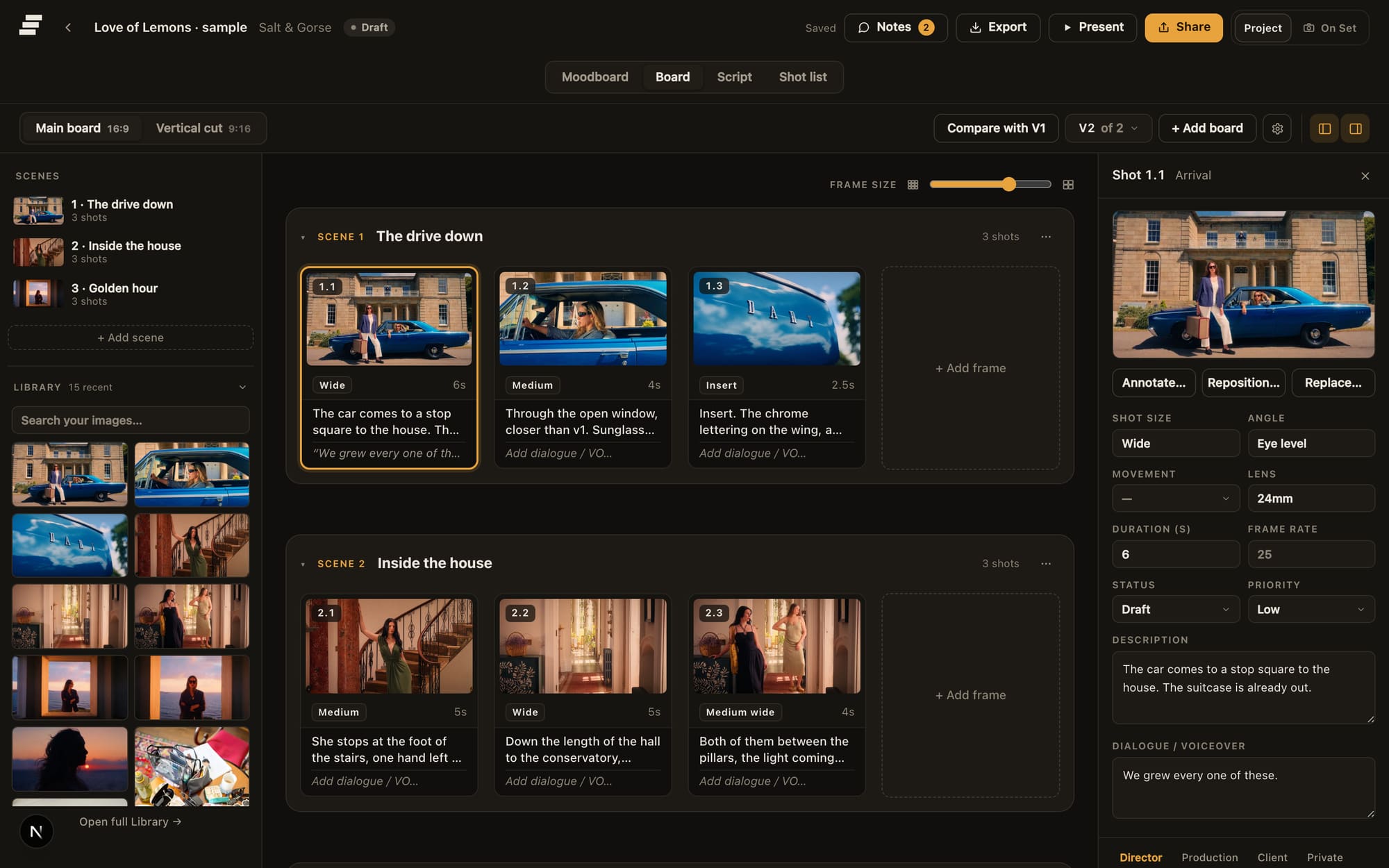
The board at a desk: frames, captions and shot data in one place.
The approved shots then organise into setups and shooting days. On the morning itself the same shots open on a phone in shooting order with the approved frame beside each one. Takes are logged as they happen and the good one is circled with a press and hold of about half a second, a gesture you can manage without looking. Pickups carry the reason they were needed, and continuity photographs attach to the shot they have to match rather than piling up in a camera roll.
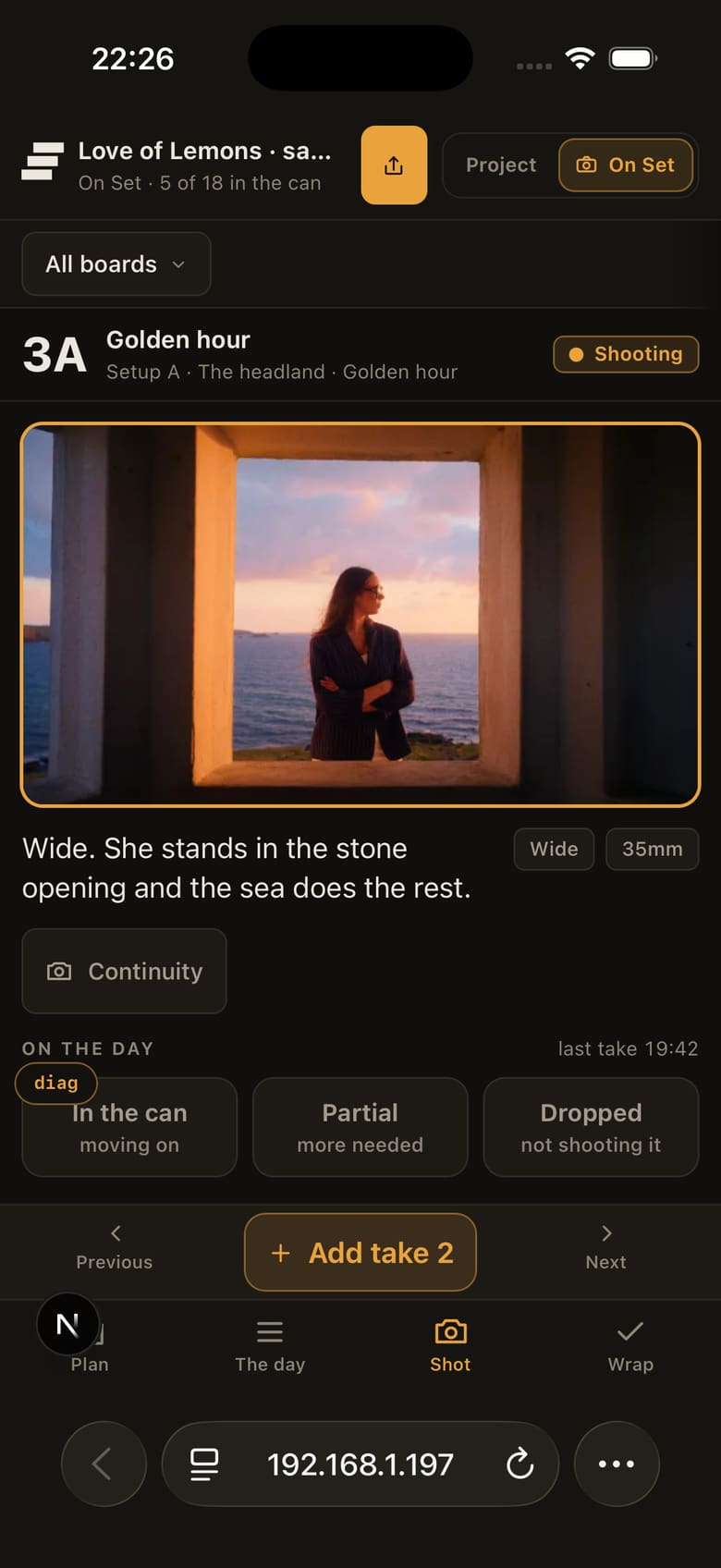
The same shot on the day: takes logged with a tap, and a hold to circle the one the edit needs.
Most storyboard tools concentrate on building, presenting and approving the board. Storybrdr carries those same shots into a shot list and shooting order, take logging, pickups, continuity and wrap, so the director, the producer and the editor are reading different stages of one record instead of three copies of it.
For a production company, the same workspace can hold several people under their own logins. Members can also be limited to named projects, which is useful when a freelancer needs one job without seeing the rest of the company's work. How Teams works has the detail.
Price: Storybrdr has three plans: Solo for one person, Studio for up to five seats and Agency for up to ten. Every feature is included on every plan, including On Set, exports and client review. Clients reviewing by link do not use a seat. Solo is £29 a month including UK VAT, which is £24.17 excluding VAT on the shared basis, billed in pounds. Thirty days free with the full product. A card starts the trial and nothing is charged until it ends. See pricing.
Where it stops. Storybrdr is not a frame-by-frame drawing or animation application. You can sketch and annotate frames, but if drawing the storyboard is the main job, use a dedicated drawing tool and bring the finished frames into Storybrdr. It does not currently generate storyboard frames, and it is not trying to replace production-office software with call sheets, script breakdowns and full production scheduling.
Toon Boom Storyboard Pro
If professional drawing and frame-by-frame animation are the priority, Storyboard Pro is built specifically for that job. It combines drawing, camera moves, timing, audio and animatic output in a dedicated desktop application. The cost tells you who it is for: it is priced for a studio, or for somebody who boards for a living, rather than for a director doing four commercials a year.
Price: Toon Boom's shop published Storyboard Pro in pounds on 8 September: £69.00 a month, £600.00 a year or £1,710.00 every three years, with a student rate of £8.75 a month or £70.50 a year. The page carries no wording on whether those figures include VAT, so they are quoted exactly as shown. There is a 14-day free trial.
It makes boards, and that is the whole of it. Client approval, shot lists, scheduling and anything on the day are outside it, and it is desktop software, so it will not follow you to a location on a tablet.
Boords
Boords is built around creating, presenting and approving storyboards. It includes drawing, client sharing, animatics, generated frames and a shot list built from the approved board, with higher tiers adding users and larger AI-image allowances. For teams whose workflow centres on the board and animatic, it covers that part of pre-production in one browser tool.
Price: Solo $39 a month or $26 billed yearly, one user, 250 AI images a month. Pro $75 or $50, up to 5 users and 1,000 images. Team $125 or $85, up to 10 users and 2,000 images. Agency $250 or $165, up to 30 users and 3,000 images. Enterprise on request. Billed in US dollars; on the shared basis Solo is about £28.82 a month, or £19.22 billed yearly.
Where it stops. The product is built around producing and approving the board, and while it now turns an approved board into a shot list, nothing in it records the day itself: no takes, no pickups, no continuity. Features and image allowances step up through the tiers, so the tier you start on is not always the tier you stay on, and a UK buyer absorbs the card conversion. Head to head at Storybrdr vs Boords; the wider field is in Boords alternatives in 2026.
StudioBinder
StudioBinder covers much more of the production office than storyboarding: screenplays, AV scripts, breakdowns, stripboards, schedules, call sheets, sides and a contacts database, with storyboards as one module inside it. If your real problem is coordinating cast, crew, locations and paperwork across a scripted job, that breadth is the point, and no dedicated storyboard tool substitutes for it.
Price: published on StudioBinder's own support centre on 8 September, because the pricing page itself does not render outside the app: Starter $29 a month with 1 included user, Indie $49 with 2, Professional $99 with 4, and additional users at $25 per user per month. On the shared basis, about £21.43, £36.22 and £73.17 a month, and roughly £18.48 for each extra seat.
Storyboarding is a module rather than the product, and the storyboard features step up through the tiers, so the boarding you want can sit above the plan you would otherwise buy. The day is served by a responsive web app rather than a native one, and their support centre recommends a computer for anything beyond reading and ticking: shots can be checked off on a phone, and there is no take, circled take, pickup or continuity record attached to the frames. For a director whose problem is the path from plan to shoot, it is a lot of platform for one module. More in Storybrdr vs StudioBinder.
Storyboarder by Wonder Unit
Storyboarder is free, open source, and runs on Mac, Windows and Linux. Six drawing tools, a new board with a click, dialogue and action fields, Photoshop round-tripping, and export to Premiere, Final Cut, Avid, PDF and animated GIF. Wonder Unit's stated reason for giving it away is that they would rather make films than sell software, and nothing is held back behind a subscription.
Price: nothing.
It is a desktop drawing tool and the project file lives on your machine. Collaboration, client review, approvals and any kind of production tracking are outside its scope, so it tends to sit alongside something else rather than replace it.
Shotwright
Shotwright puts references, shot lists, call sheets and crew information onto a single freeform board, and is explicit that it is not an editor: it handles the work before the timeline and then exports. It brings more production information onto the same surface than a conventional frame-by-frame storyboard.
Price: Free with 5 documents a month and unlimited editors. Pro $19 per editor a month with 50 documents, then $1 each. Studio $49 a month plus $12 per seat with 250 documents pooled across the workspace. Boards and canvas nodes are unlimited on every tier. On the shared basis Pro is about £14.04 per editor, Studio about £36.22 plus £8.87 a seat.
The structure is yours to build, which is the appeal and also the cost. A freeform canvas will hold a shot list perfectly well and will also let you invent a different arrangement on every job, which becomes a problem the first time three people need to read it the same way. The document allowances are the real ceiling: five a month on the free tier is a project or two. And the board still stops at the door of the set.
Storyflow
Storyflow puts a whole project on one board with an AI that reads across it, with image generation from Pro upwards and a library of prompt-driven approaches. If AI-generated storyboard frames are important to your workflow, this and Boords are the two products here built around them, and Storyflow is the more committed of the two.
Price: Free $0. Plus $9.99 a month or $95.88 a year, Pro $19 or $168, Max $49 or $468, which the page headlines as $7.99, $14 and $39 a month paid yearly. Storyflow's pricing page currently lists its Free plan as coming before the end of 2026, with 20 file uploads and no image generation. Team discounts start at 20% from three seats. On the shared basis, Plus is about £7.38, Pro about £14.04 and Max about £36.22.
The image allowance is the pricing mechanism, so your tier gets chosen by your generation habit rather than by how many of you there are, and generation is gated to Pro and above. There is no shoot-day record, and if generated frames are not central to how you work, much of what you are paying for sits unused.
Milanote
Milanote makes most sense earlier in the process, when you are gathering references, building a look and developing a treatment. The canvas suits gathering references, building a look and thinking in pictures before anybody needs shot numbers.
Price: free for 100 notes, images or links and 10 file uploads, with no time limit. Then $9.99 a month billed annually, or $12.50 monthly, per person, which is about £7.38 or £9.24 on the shared basis. There is a team plan at $49 a month billed annually; its seat count is set by a selector on the page and did not read cleanly on 8 September, so check that before buying.
The flexibility that makes it good for treatments makes it hard work for production. Scenes, shots, shooting order, lenses, approvals and status all have to be invented and then maintained by hand, on every job. Storybrdr's moodboard and library exist for that handover, where images stop being references and start being shots.
Celtx
Celtx approaches production from the page: script, then breakdown, then planning, then storyboards. For narrative work that genuinely begins in the writing, that is the natural order, and the ladder of plans runs Writer, Writer Pro, Team, Education and Student.
Price: Celtx's pricing page shows plan names and features but renders no figures, so none are quoted here. The structure it does state: storyboards and shot lists are optional add-ons on Writer and Writer Pro and included on Team, Education and Student, the Team plan covers 3 to 15 members, and annual billing is advertised as saving 25%. Check the figures at celtx.com.
Where it stops. The storyboard sits downstream of the script, and on the writer-level plans it is something you add rather than something you have. On commercials, promos and branded work, where there is often a treatment and a board but no screenplay at all, the shape of the product works against you.
Plot
Plot does frames, scenes and sharing in a browser and attaches no production platform to any of it. A small job does not always need a production system behind the board, and Plot keeps that workflow deliberately simple.
Price: Solo $9.99 a month with no collaborators. Pro $14.99 with 5 collaborators. Business $19.99 with unlimited collaborators. Storyboards are unlimited on all three, and there is a free account and a 14-day trial. On the shared basis, about £7.38, £11.08 and £14.77 a month.
Detailed shot information, structured approvals and production tracking are outside it, and collaboration is the upgrade lever, so a team that grows tends to grow past Plot rather than up through it.
Canva
Canva is not filmmaking software. It is here because sometimes a board only needs to put images in sequence and make them presentable. Canva can do that quickly without introducing another specialist tool.
Price: free for one person. Pro $180 a year for one person, Business $250 a year per person, Enterprise on request. Canva state that prices exclude applicable tax. On the shared basis Pro is about £133.04 a year, roughly £11.09 a month.
A frame in Canva is a picture in a layout. There is nowhere to put a lens, a duration, a status or a take, and no review flow built around approving film work, so everything a board carries has to be typed into the picture or sent separately.
Shot Lister
Shot Lister is not storyboard software, and that is why it is here: it solves the part of the problem most of this list leaves alone. It has been used on iOS and macOS for years to build shot lists, track progress and keep a crew looking at the same running order.
Price: a free version. Pro $15.99 a month or $99.99 a year, including crew sync for up to 10 people, storyboards, script import, unlimited projects and Apple Watch support. Studio from $24.99 a month for 10 users, rising to $94.99 for 80. On the shared basis, Pro is about £11.82 a month or £73.90 a year.
The catch is that the board is built somewhere else and there is no client approval in it, so the plan and the record of the day sit in two systems. iOS and macOS only.
What the entry price buys
Prices are as each vendor published them on 8 September 2026, under the plan name they use. Because a dollar figure and a pound figure including VAT are not comparable, every price also appears on one shared basis: pounds excluding VAT at the European Central Bank reference rate of 4 September 2026, $1 = £0.7391. A UK card also pays whatever its bank charges to convert.
- Storyboarder, and Shotwright on its free tier: nothing.
- Milanote, Plot Solo and Storyflow Plus: about £7.38 a month.
- Canva Pro: about £11.09 a month, billed yearly.
- Shot Lister Pro: about £11.82 a month.
- Shotwright Pro and Storyflow Pro: about £14.04 a month.
- Storybrdr Solo: £24.17 a month, billed in pounds.
- Boords Solo: about £28.82 a month, or £19.22 billed yearly.
- Toon Boom Storyboard Pro: £69.00 a month, published in pounds with no stated tax treatment.
Celtx is absent because its pricing page shows no figures. StudioBinder Starter sits at about £21.43 a month, from the support-centre figures above.
Price alone makes this list look closer than the products really are. A £10 board tool, a £25 production workflow and a £70 animation application are solving different problems. The more useful comparison is what happens to the storyboard after the frames are assembled.
And the capabilities that tend to settle a purchase:
- Review by link, with no account for the client: Storybrdr, Boords, StudioBinder.
- Animatics as a core part of the product: Toon Boom, Boords.
- Drawing tools built for boarding: Toon Boom, Storyboarder.
- AI-generated frames: Boords, Storyflow.
- Shooting order on a phone, with takes and continuity: Storybrdr, Shot Lister.
- Call sheets and scheduling: StudioBinder, Shotwright, Celtx.
- Billed in pounds: Storybrdr, Toon Boom.
That combination of client storyboard review and a shoot-day workflow in the same product is where Storybrdr differs most clearly from the other tools in this comparison.
Are you drawing the film, or planning the shoot?
For filmmakers, this distinction usually matters more than the price of the software.
For animation, the board is the film in its first form. Timing, camera moves and staging are held on a frame count, and the board is drawn by somebody whose job is drawing it. The tool has to be a drawing application first and everything else second, which is why Toon Boom is priced the way it is and why Storyboarder is the free answer to the same question.
For work going in front of a camera, the board has another job. Each frame becomes a shot that has to be planned, approved, organised and eventually captured. Lens choices, shot information, shooting order and what happened on the day matter alongside the picture.
That is the workflow Storybrdr is built around. If you draw the frames elsewhere, bring them in. Storybrdr takes over when those pictures need to become a working plan for the production.
Client review
If your work gets approved by somebody who is not a filmmaker, this is usually the feature that decides the purchase, and the test is narrow. Can a client with ten minutes and no account say what they think, against the right frame?
Storybrdr, Boords and StudioBinder all offer review by link with no account for the reviewer. The differences sit either side of that. A comment has to land on a frame, or somebody spends an evening transcribing an email thread onto the board by hand. An approval has to be a state the board carries, so that six weeks later nobody is scrolling back through messages to work out which version the client said yes to.
In Storybrdr the link is set up per board with the options you want on it: comments, approval, downloads, version comparison, a password, an expiry date. Every reviewer gives a name before they can leave a note or approve. A board link carries the board and nothing else, so the project's moodboard does not travel with the shots.
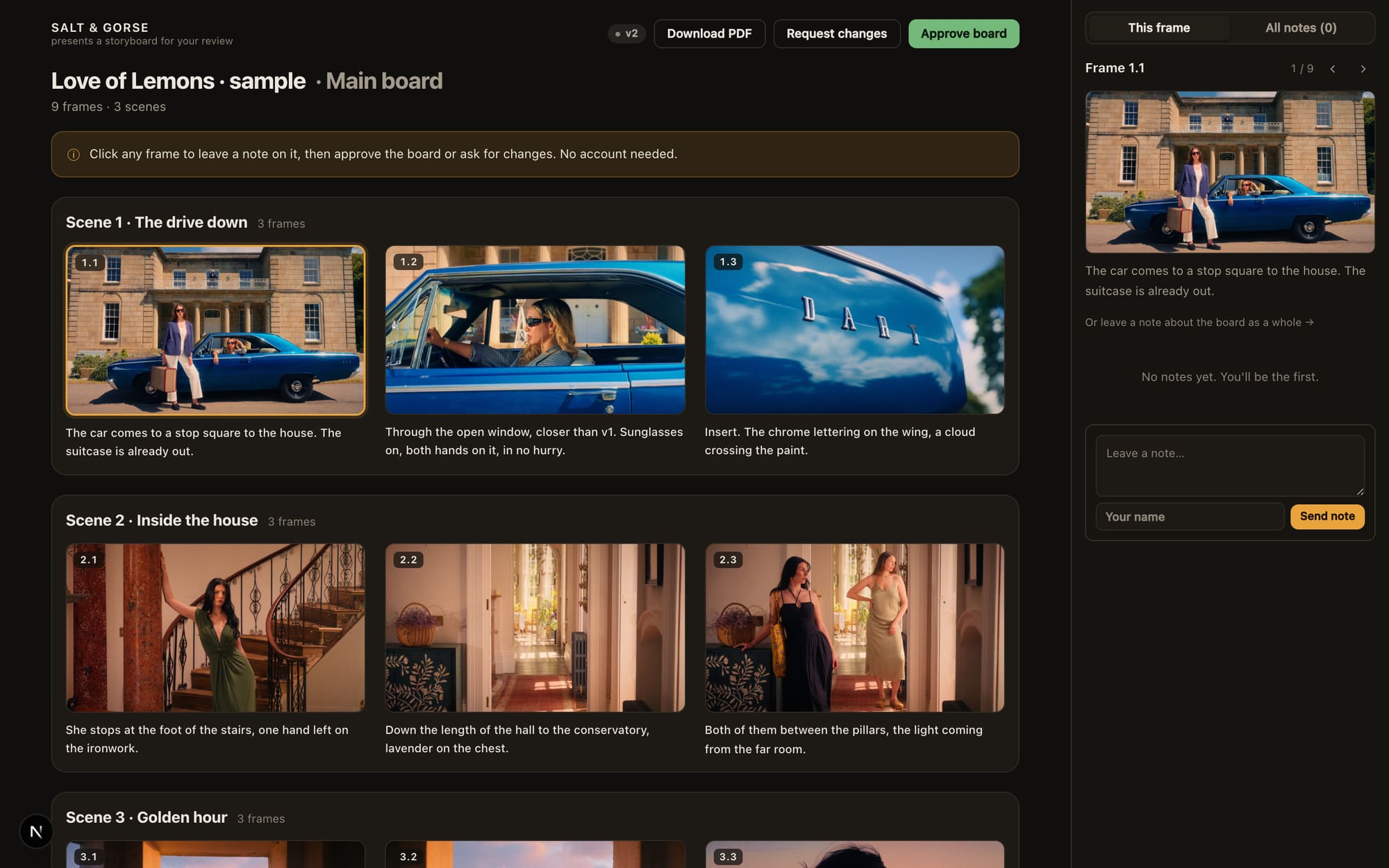
What the client gets: the board, numbered comments, and a way to say yes.
Share links matter after the review as well as during it. In Storybrdr, a lapsed workspace goes read-only. Every board still opens for you and PDF export still works. Editing, comments and existing client links pause until the subscription is reactivated, then the same links work again.
The shoot day
This is where Storybrdr separates most clearly from conventional storyboard software. The approved board does not become reference material sitting beside the shoot plan. It becomes the shoot plan.
Shots can be organised into the order they will be captured, then opened on a phone with the approved frame and shot information still attached. Takes, circled takes, pickups and continuity stay against the shot they belong to. At wrap, the same record shows what was completed, partial or dropped.
Shot Lister also runs shooting order and progress on set, but it starts with the shot list rather than carrying forward a client-approved storyboard.
On a small crew there is often nobody whose only job is holding the day's information, so it gets held by whoever has a free hand, which means it gets held badly. Storybrdr's answer is to make the record a side effect of running the day rather than admin reconstructed at wrap. The day is laid out first, then worked through setup by setup, and each shot opens with its approved frame at the top. Wrap then adds up what is in the can, what is partial and what was dropped, and produces a handover the editor can read.
On smaller shoots, it keeps useful information from disappearing into notebooks, camera rolls and messages while the day is moving. Running a shoot day from your phone goes through what is worth recording; On Set shows the views themselves.
Export, and what leaves the building
Most of the people on the job will only ever see what comes out of the tool. Does the PDF look like something you can send a client without apologising, in the ratio you are actually shooting? Can the shot data leave as data, so a producer can drop it into a schedule without retyping forty rows? And does the export carry the vendor's mark across your client's board?
Storyboarder exports to Premiere, Final Cut, Avid, PDF and animated GIF, which is generous for free software. Boords and Toon Boom both produce animatics, and Storyboarder gets part of the way there with its GIF and edit exports. Storybrdr exports PDF in every ratio, PowerPoint slides and CSV for the shot list, with no watermark on a customer's export. The free printable storyboard templates, such as the 16:9 storyboard template, carry a mark, because they are marketing. Paid work does not.
Questions people ask
Is there free storyboard software worth using? Yes. Storyboarder from Wonder Unit is free and open source for Mac, Windows and Linux, and it is a proper drawing-based storyboard application rather than a limited trial. Shotwright's free tier gives five documents a month, Milanote is free for the first 100 notes, images or links, and Canva's free plan will produce a template board. What the free options consistently do not cover is anything after approval.
What storyboard software do filmmakers and storyboard artists use? Storyboard artists often draw in dedicated software such as Toon Boom Storyboard Pro or Procreate. Directors may use the same tools, but boards for commercials and branded films are also commonly assembled from reference stills, photographs, sketches and treatment frames.
Storybrdr is built for that second workflow. Bring in the frames however they were made, organise and share the board, then keep the same shots through planning and onto the shoot.
What is the best storyboard app for iPad? For drawing frames, Procreate, which is a one-off App Store purchase rather than a subscription. For arranging, sharing and reviewing a board, Storybrdr runs in the tablet browser and is designed to keep the same project usable when you take it onto the shoot. Toon Boom Storyboard Pro is desktop software and does not run on an iPad. Most artists I know draw in Procreate and organise somewhere else. For a fuller comparison, see our guide to the best storyboard apps for iPad and storyboarding on a phone.
Storyboard or shot list? Both, and they are different documents. The board says what the frame looks like; the shot list says what has to be built to get it, and in what order. They are usually kept apart because most tools make one or the other, so the same information gets typed twice and the two copies disagree by the second week. In Storybrdr they are two views of the same shots, which is also why the shooting order can be rearranged without disturbing the story order.
Does the client need an account? In Storybrdr, no, and that is worth treating as a minimum standard rather than a feature. A client who has to create an account to leave a note will phone you instead, and the note then exists nowhere.
What is the best way to make a storyboard for a commercial? For a commercial, start with the frames that communicate the idea clearly enough for the agency, client and production to discuss the same shots. Those might be sketches, reference stills, photographs or frames already used in the treatment. Put them in story order, add the shot information the production needs, and share the board for notes and approval.
Once it is approved, keep the shot numbers consistent as the production moves into the shot list and shooting order. That is the part Storybrdr is built around: the frames approved before the shoot remain attached to the shots being planned and captured. How to storyboard a commercial goes through the whole run, from the treatment's references to the client's sign-off.
Can I bring my boards over from another tool? Not automatically, from anywhere, including here. Most people start the next job in the new tool and leave the old boards where they are, since those productions have generally wrapped by the time anyone is choosing software. Moving over from another tool has the practical route.
So which storyboard software should you choose?
For the kind of work Storybrdr is built for, commercials, branded films, music videos and other shoots where a storyboard has to become a real production plan, I would choose Storybrdr.
Build the board from your own frames and references. Share it for notes and approval. Organise those approved shots for the day. Then open the same shots on set to work through the schedule, log takes, keep pickups and continuity together, and hand the record on at wrap.
If your main job is drawing frame-by-frame animation, choose a dedicated drawing application. If you need a full production-management platform built around scripts, call sheets and scheduling, choose one of those. Storybrdr is deliberately focused on the space between them: the storyboard, the plan and the shoot.
That is the workflow I wanted when I started building it, and it is still the reason Storybrdr exists.
If you would rather start on paper, the free storyboard templates print in five ratios and a shot list, with no signup and no email.